
3D print thread generator: bolts, nuts, threaded caps and jars
Pick what you need: a hex bolt with its nut, a jar or bottle neck with a screw cap, or a threaded insert for a part of your own. Set the size (M6 to M30 in coarse or fine pitch, or any jar diameter, pitch and number of starts), the length, the profile and the clearance between the flanks, and watch the nut, the cap or the screw turn on in the viewer.
- Free, no account to download
- STL, 3MF and STEP
- Screw motion checked for clearance
Parameters
Loading the sliders...
Sliders and downloads are free. The AI designer uses credits; new accounts start with free ones.
Every thread is a real helical thread built on our CAD engine, with a lead-in chamfer and the clearance split between the two parts, and the pair is turned along its whole travel with the gap measured: the line under Play gives the result. Download STL or 3MF (the parts stand axis up, the way threads print best) or STEP to put the thread on your own design. Free, and no account is needed to download.
Start from an example
Finished designs from the Library to start from: open one, set its sliders, download it or change it with AI.
Why printed threads need clearance
A steel nut fits a steel bolt because both are made to a tolerance class a few hundredths of a millimetre wide. A printed thread is built from layers 0.2 mm tall: each flank becomes a staircase, the first layers spread a little wider than the model, and the plastic shrinks as it cools. Model the thread at its nominal size and the nut binds or fuses to the bolt. The fix is a gap between the flanks: the generator starts at 0.2 mm and splits it between the two parts, so a printed bolt and a printed nut each give up half.
| Feature | Start with | Range | Notes |
|---|---|---|---|
| Printed thread, axis vertical | 0.2 mm radial | 0.1 to 0.3 | Model threads from M8 up, use inserts below; 45 deg lead-in |
| First layer (elephant foot) | 0.5 mm x 45 deg chamfer | 0.3 to 1.0 mm | On the bottom edges of both mating parts; never start a moving gap on layer 1 |
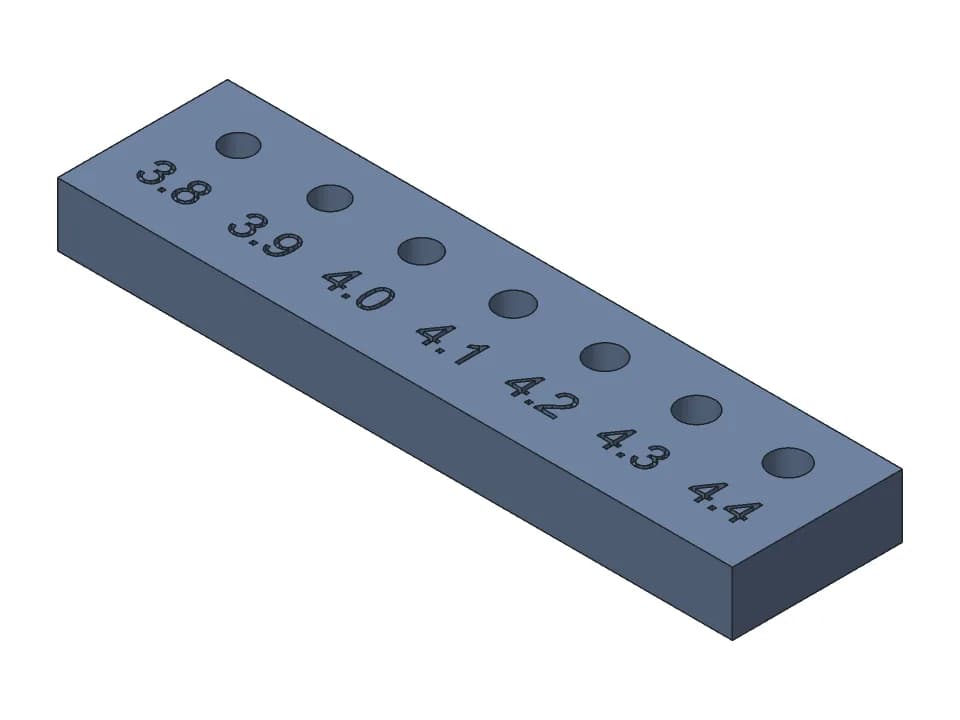
| Heat-set insert hole | M3: 4.0 mm (+0.2 in CAD when printed) | M3 4.0 to 4.2 | Pull-out strength drops above 4.2 mm for M3 |
| Captive hex nut | M3: 5.5 mm across flats + 0.3 | +0.2 to +0.3 | Measure your real nuts |
Your printer's number is the one that counts: the tolerance test prints two M10 nuts on one bolt at 0.15 and 0.25 mm. If the 0.15 nut runs by hand, use 0.15; if neither runs, go to 0.3 mm. Saved to your fit profile, it becomes the slider's starting value.
Which profile prints without supports
The ISO metric profile has 60 degree threads: each flank is 30 degrees from the horizontal when the bolt stands up, an overhang of 60 degrees from the vertical. On threads M10 and up each overhang is short enough that it prints without supports on most printers, and it is the only profile that mates with steel hardware. The printable profile leans its flanks 50 degrees from the horizontal (40 degrees of overhang, inside the 45 degree rule) and is 0.3 x pitch deep: cleaner flanks, a little weaker, and it only mates with itself.
| Profile | Flank angle | Overhang standing up | Depth | Use it for |
|---|---|---|---|---|
| ISO metric | 30° from horizontal | 60° | 0.54 x pitch | Parts that take a steel bolt or nut |
| Printable | 50° from horizontal | 40° | 0.3 x pitch | Printed pairs, jars, caps, knobs |
Minimum sizes: below M8 use inserts or pilot holes
An M8 coarse thread is 0.68 mm deep: about two lines of a 0.4 mm nozzle, the practical minimum for a printed thread. An M6 thread (0.54 mm) prints rough, and M5 and smaller come out as ridged holes. For small screws, print a plain hole and add the thread another way:
- A brass heat-set insert, pressed in with a soldering iron: the strongest option. The hole is slightly smaller than the insert (M3: 4.0 mm for a 4.6 mm insert).
- A captive hex nut in a pocket 0.2 to 0.3 mm wider than the nut across flats.
- A pilot hole for a self-tapping screw, about 85% of the screw diameter, in a boss with at least 3 perimeters.
Hole sizes for inserts, nut traps and screws are in our 3D print hole size guide, and the Library's heat-set insert test prints a row of holes to find the one your inserts like. Need a big threaded hole in a part of your own? The insert mode makes a hex insert with a flange and gives the pocket to model for it.
Metric thread sizes
| Size | Coarse pitch | Fine pitch | Hex across flats | Nut height | Printed |
|---|---|---|---|---|---|
| M6 | 1.0 mm | 0.75 mm | 10 mm | 5.2 mm | Test only: use an insert or a steel screw |
| M8 | 1.25 mm | 1.0 mm | 13 mm | 6.8 mm | The smallest that prints reliably |
| M10 | 1.5 mm | 1.25 mm | 16 mm | 8.4 mm | Good first test (the tolerance coupon uses it) |
| M12 | 1.75 mm | 1.5 mm | 18 mm | 10.8 mm | The generator's default |
| M16 | 2.0 mm | 1.5 mm | 24 mm | 14.8 mm | |
| M20 | 2.5 mm | 1.5 mm | 30 mm | 18 mm | |
| M24 | 3.0 mm | 2.0 mm | 36 mm | 21.5 mm | |
| M30 | 3.5 mm | 2.0 mm | 46 mm | 25.6 mm | Big and strong in plastic |
Jar and bottle threads
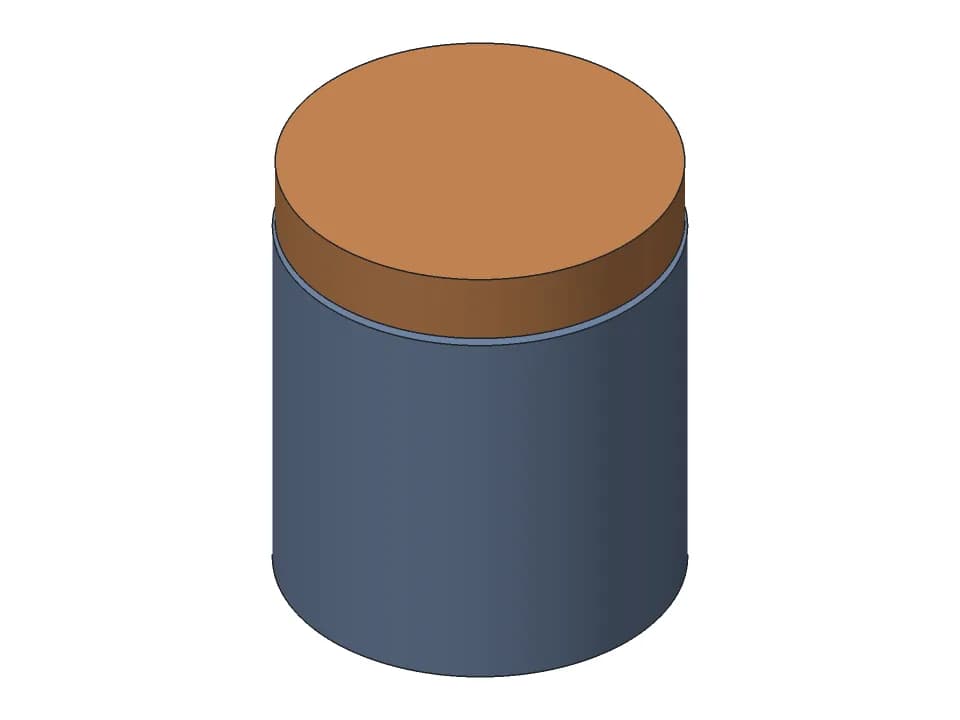
Container threads are coarse and shallow: 3 to 5 mm pitch on a 40 to 90 mm neck, with one and a half to two turns to close. The jar mode builds a neck and a cap on the printable profile, with 16 flats around the cap for grip. The cap seats on the neck's rim, which is where it seals if you add a gasket. With 2 or 3 starts the cap closes in one turn, like most food jars, with the same deep thread. Set the body height to 0 for a neck ring on a flange that you can glue onto a container of your own.
The Library's screw-top jar is a finished jar to start from; the box generator makes square boxes with lift-off, sliding and hinged lids.
Printing tips
- Stand every threaded part on its end, axis vertical; the download does this (bolts on their head, caps on their top, inserts on their flange).
- Use 3 or more walls so the teeth are solid plastic, and 0.2 mm layers or finer for pitches under 2 mm.
- The lead-in chamfer at the open end helps the first turn catch; if the nut is tight only at the start, it is the first layer: add elephant foot compensation.
- PETG and PLA both work; PETG needs about 0.05 mm more clearance. A drop of dry lubricant helps printed threads that turn often.
What the screw check does
The nut, the cap or the screw is turned along its whole travel on our CAD engine, moving one lead per turn as a real thread does, and the distance to the other part is measured at every pose. The line under Play gives the flank gap measured on the model and where the part seats and comes off the thread. It checks the geometry, not your printer: the clearance you set still has to suit your machine.
FAQ
Questions about the thread generator
How much clearance do 3D printed threads need?
About 0.2 mm between the flanks on a 0.4 mm nozzle, where the generator starts. A tuned printer may run 0.15 mm; an older printer or PETG 0.25 to 0.3 mm. A printed thread with no clearance fuses or binds, because the layers make each flank a staircase and the plastic spreads a little wider than the model. Our tolerance test has two M10 nuts at 0.15 and 0.25 mm to find your number.
What is the smallest thread you can 3D print?
About M8 on a 0.4 mm nozzle. An M6 thread is only 0.54 mm deep, close to one line of plastic, so it prints rough: the generator makes it for a test and says so. For M6 and smaller, use a heat-set insert, a captive nut or a pilot hole for a self-tapping screw instead of a printed thread.
Should I use the ISO profile or the printable profile?
Use ISO (60 degree threads) when the part must take a steel bolt or nut. Use the printable profile when both parts are printed: its flanks lean 50 degrees from the horizontal, so standing up they overhang 40 degrees instead of 60, which prints cleaner without supports. The two profiles do not mate with each other. Jar necks and caps always use the printable profile.
Should I print threads standing up or lying down?
Standing up, with the thread axis vertical: each layer is then a slice across the thread and the flanks come out round. Lying down, the thread is flattened on one side and its layers split along the bolt under load. The download stands every part axis up, bolts on their head and caps on their top.
Coarse or fine pitch for a printed bolt?
Coarse. A deeper thread forgives the layer steps and the squish, and it is stronger in plastic. Fine pitches under 1.25 mm make teeth a few tenths of a millimetre deep; keep them for parts that must fit a fine-pitch steel thread.
What does the number of thread starts change?
With 2 or 3 starts, two or three threads run side by side, so the cap travels 2 or 3 pitches per turn: a jar closes in about one turn with the same thread depth, the way most food jars do. The pitch stays the size of each tooth; the lead (how far the cap moves per turn) is pitch x starts.
Can a printed nut go on a steel bolt?
With the ISO profile, yes in principle: the nut's thread is the metric profile opened up by the clearance you set. Printers differ, so print one nut and try it on your bolt before you rely on it, and raise the clearance by 0.05 mm if it binds. For load, a steel nut in a hex pocket or a heat-set insert is stronger than any printed thread.
Is the thread generator free?
Yes. The sliders, the screw check and the STL, 3MF and STEP downloads are free and need no account. Saving to your designs needs a free account; asking the AI designer to put the thread on your own part uses credits, and new accounts start with free ones.
More free tools
Designing the rest of the part yourself? The guide to CAD for 3D printing compares the software and gives the FDM rules for walls, holes, overhangs and tolerances.
Gridfinity generator
Gridfinity bins and baseplates to the spec, baseplates sized to your drawer and split for your bed.
Gear generator
Spur gear pairs that mesh and turn, with the ratio, FDM backlash and a collision check.
Planetary gear calculator
Ratios for every fixed member, valid tooth counts from a target ratio, and a 3D set to print.
3D print hinge generator
Print-in-place hinges and hinged boxes, with the gap checked through the swing.
Box generator
Boxes sized by their inside, with a lift-off, sliding or hinged lid, dividers and labels.
Snap fits for 3D printing
Cantilever snap fits sized for FDM: strain per filament and print direction, STL to test.
3D print tolerances
A clearance chart for FDM fits, and one small print that measures your own printer.
Need something these sliders can't make?
Describe the part in plain words: a gearbox for your motor, a box with this hinge, a case that snaps shut. The AI designer builds it as real CAD, checks the fit and the motion, and gives you sliders and print-ready files.
Start designing for free