BuildCAD AI

Gridfinity bin with a label lip, customizable: any size, compartments and scoop

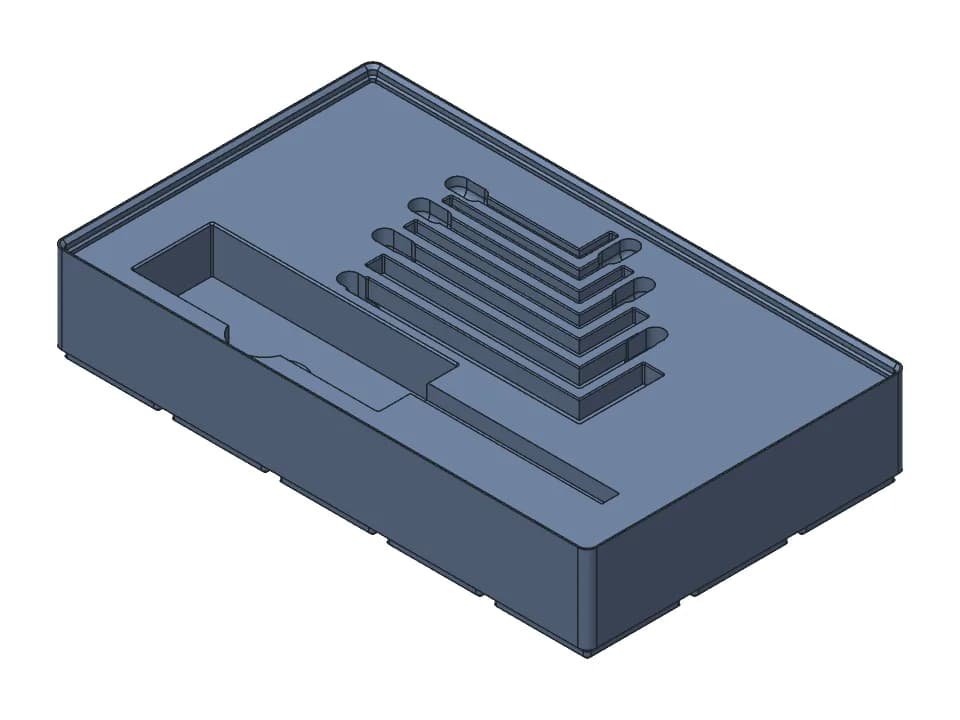
A Gridfinity bin for small parts with a label lip along the back, a finger scoop at the front and divider walls. The default is 3 x 2 cells and 6 units tall (125.5 x 83.5 x 45.8 mm with the stacking lip), split into 3 compartments, with a 13 mm deep label shelf that takes 12 mm label tape. Set the width and depth from 1 to 6 cells, the height from 2 to 12 units, up to 6 compartments and up to 4 rows, each row with its own label shelf.

Customize Change it with AIFree STL, 3MF and STEP, no accountMeasured on the model

Parameters

Width (grid units of 42 mm)
Depth (grid units of 42 mm)
Height (units of 7 mm)
Compartments across the width
Rows front to back (each gets a label ledge)
Wall thicknessmm

Sliders and downloads are free. Changes by the AI designer use credits like any design; new accounts start with free ones.

It prints feet down as modelled, without supports: the label shelf has a 45 degree underside. The feet and stacking lip come from buildcad's Gridfinity helper, built to Zack Freedman's open spec (42 mm grid, 7 mm height units) and checked on the model to seat in a baseplate and stack on another bin. Pockets for 6 x 2 mm magnets are a switch, off by default. Print a small bin first to check the fit in your own baseplate.

Parameters

Every slider in the viewer above, with the range the model accepts. The model rebuilds valid at both ends of each range.

ParameterRangeDefaultWhat it changes
Width (grid units of 42 mm)1 to 63Width in 42 mm grid cells. The bin is 0.5 mm narrower than its cells so it drops into a baseplate.
Depth (grid units of 42 mm)1 to 62Depth in 42 mm grid cells, front to back.
Height (units of 7 mm)2 to 126Height in 7 mm units to the top of the wall. The stacking lip adds 3.8 mm on top.
Compartments across the width1 to 63How many compartments side by side, split by 1.2 mm divider walls.
Rows front to back (each gets a label ledge)1 to 41Rows of compartments front to back. Each row gets its own label shelf along its back.
Wall thickness0.8 to 2.4 mm1.2 mmOuter wall thickness. 1.2 mm is three 0.4 mm lines; keep it a multiple of your line width.
Label ledge along the backOn or offOnThe label shelf along the back of each row, 13 mm deep at the defaults for 12 mm tape.
Finger scoop at the frontOn or offOnCurves the floor up to the front wall so small parts slide out under a fingertip.
Magnet holes in the baseOn or offOffPockets for 6 x 2 mm disc magnets under the feet, 4 per cell. Their ceilings print as short bridges.

Proof: measured on the model

What the design must satisfy and what our CAD engine measured on the model at the default values. Only measured values are shown here; nothing on this page has been printed by us yet.

RequirementWantedMeasured
Outside width of 3 grid cells (3 x 42 mm less 0.5 mm)125.5 mm125.5 mm
Outside depth of 2 grid cells83.5 mm83.5 mm
Height of 6 units plus the stacking lip (6 x 7 mm + 3.8 mm)45.8 mm45.8 mm
Compartments across the width, counted between the walls3 compartments3
Depth of the label shelf in front of the back wall, for 12 mm tape13 mm13 mm
Floor height 8.5 mm behind the front wall, where the scoop rises (the flat floor is at 7 mm)above 10 mm12.453 mm
  • valid solid, one body, 125.5 x 83.5 x 45.8 mm, fits a 256 x 256 x 256 mm printer; overhangs: 3.9% of surface would need support.

Print notes

Orientation
Feet down on the bed, as modelled.
Supports
None. The label shelf has a 45 degree underside, and with magnet holes on, the 6.5 mm pocket ceilings are short bridges.
Material
PLA or PETG
Layer height
0.2 mm
Settings
Keep the wall a multiple of your line width (1.2 mm is three 0.4 mm lines) so the slicer leaves no gaps
Hardware
24 x 6 x 2 mm disc magnets (optional, with magnet holes on, 4 per cell)
Time and filament
About 4 h 15 min and 90 g at the default size: a rough estimate from the model's volume and surface (PLA, 15% infill, about 1 mm of walls, 0.2 mm layers), not a slicer.
  • Print a 1 x 1 bin, 2 units tall, before a batch and try it in your baseplate. The feet follow the published spec, but printers differ by a few tenths of a millimetre.
  • The magnet pockets open under the feet and are 6.5 mm wide for 6 mm magnets: glue the magnets in, all the same way up, so they pull toward the magnets in your baseplate.
  • The label shelf is 13 mm deep, measured on the model: 12 mm label tape fits with a little room.

How it was designed

Designed with buildcad's AI agent, checked by the buildcad team. This is the request it started from and an edited account of what it did (more on how text to CAD works).

The request

A Gridfinity bin for the small parts drawer on my workbench: 3 x 2 grid units, 6 units tall, split into 3 compartments across the width. It needs a label lip along the back of each row that holds 12 mm label tape, a finger scoop at the front so screws slide out, and magnet holes in the base as an option. Make the width, depth, height and number of compartments adjustable.

  1. 1

    It used the Gridfinity helper

    The agent built the bin with buildcad's Gridfinity helper, which follows Zack Freedman's published spec: 42 mm cells, 7 mm height units, the standard feet and stacking lip. For 3 x 2 cells and 6 units it set out to measure 125.5 x 83.5 mm outside, 45.8 mm tall with the lip, and 24 magnet pockets of 6.5 mm.

  2. 2

    The first build, then the label shelf

    The first build was one valid body at exactly those sizes. Probing down and across the back of each compartment, it found a flat label shelf 13 mm deep with a 45 degree underside, enough for 12 mm label tape.

  3. 3

    Compartments and scoop measured

    A ray across the bin crossed 4 walls of 1.2 mm, the 2 outer walls and 2 dividers, so 3 compartments. Rays down the front showed the floor curving up from 7.2 mm high at 21 mm from the front wall to 16.7 mm at 5.8 mm from it: the finger scoop.

  4. 4

    A rows option and the sweep

    It added a "Rows front to back" slider, each row with its own label shelf, said so in its reply, and rebuilt all 11 slider extremes as one valid body each.

  5. 5

    The overhang warning

    The printability check flagged 5.0% of the surface. The agent put it down to the label shelf and the stacking lip and said they print fine without supports.

  6. 6

    Our change

    We found the warning came from the magnet pockets: their 24 ceilings are 6.5 mm bridges over the feet, and without them the check reads 3.9%. We set the magnet switch off by default, so the default bin passes every check. Turn it on if you use magnets: the switch and the pockets are unchanged.

One run of the agent: 1 min 15 s, about $0.26 of model time at list price (claude-sonnet-5-5). We changed the code afterwards, as described in the last step.
Change it with AI

Set the sliders, then press Change it with AI: a copy goes to your designs at those sizes and the designer opens with a suggested change you can edit. Its changes use credits like any design; new accounts start with free ones.